How Codex CLI Manages Context: Agent Loop, Caching, Compaction
Every AI coding agent runs the same loop: infer, call a tool, append output, repeat. But how Codex CLI handles prompt growth, caching invalidation, and context compaction determines whether you're spending tokens efficiently or burning them. This breakdown covers the internals, the research on AGENTS.md files and Skills, and what it all means in practice.


TL;DR
AI coding agents like OpenAI's Codex CLI, Claude Code, and Gemini CLI all share the same core architecture: an agent loop that cycles between model inference and tool execution. Each cycle appends data to the prompt, and each new turn carries the full weight of the conversation history. This article breaks down how Codex CLI builds its prompt from layered system, developer, and user messages alongside tool definitions, and how that prompt grows with every interaction.
Performance hinges on two mechanisms: prompt caching and compaction. Caching reuses computation from previous inference calls but only works on exact prefix matches, meaning any mid-session change to tools, models, or settings invalidates the cache and increases cost. When the prompt outgrows the context window, compaction replaces the conversation with a compressed version that preserves the model's latent reasoning through encrypted content.
This article also examines recent research on context files and agent skills. Studies show that LLM-generated AGENTS.md files tend to reduce agent performance while increasing inference costs by over 20%, while focused, human-written skill files with 2-3 modules outperform comprehensive documentation. The practical takeaway: context is finite, everything in it should earn its place, and less is consistently more.
Introduction
Every coding agent (Codex CLI, Claude Code, Gemini CLI) runs the same fundamental loop. User says something. Model thinks. Model calls a tool. Tool returns output. Model thinks again. Repeat until done.
Simple concept. The devil is in how context accumulates, how it gets cached, and how it eventually gets compressed when things get too long. Understanding this loop is the difference between burning tokens for nothing and actually getting efficient work out of these tools.
I've been digging into how Codex CLI specifically handles this, based on OpenAI's own engineering writeup and the open-source repo. Although this article specifically focuses on Codex CLI, the same concepts applies to all of these similar tools at least fundamentally. Here's what's going on under the hood.
Table of Contents
- The Agent Loop
- How the Prompt Gets Built
- Multi-Turn: The Prompt Only Grows
- Prompt Caching: Why Prefix Stability Matters
- Context Window Management: Compaction
- Statelessness and Zero Data Retention
- AGENTS.md: Do they Actually Help?
- Skills: Structured Procedural Knowledge
- So What do We Do?
- Try This
The Agent Loop
At its core, Codex CLI does the following:
- Takes your message and builds a prompt.
- Sends that prompt to the model via the Responses API.
- The model either returns a final answer or requests a tool call (like running a shell command).
- If it's a tool call, Codex executes it, appends the output to the prompt, and queries the model again.
- This repeats until the model emits an assistant message ("Done, I added the file you asked for") and the turn ends.
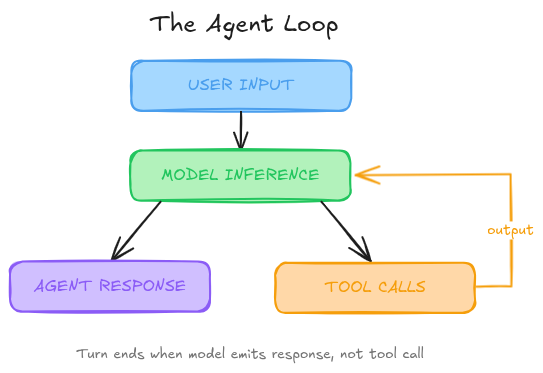
That's one turn. A single turn can contain dozens of inference-tool cycles internally. Every time you send a new message, all the previous conversation history gets bundled into the next prompt. The prompt keeps growing.
Every model has a finite context window, a hard ceiling on the total tokens (input + output) it can handle in a single inference call. An agent that makes a hundred tool calls in one turn can blow through that window fast.
This is a high level view so lets have a look at what happens deeper.
The SSE Stream
Codex sends an HTTP POST to the Responses API and gets back a Server-Sent Events stream. Each event is a JSON payload with a type field. Here's a simplified example of what that stream looks like when the model reasons, then calls a tool:
data: {"type":"response.reasoning_summary_text.delta","delta":"Let me look at "}
data: {"type":"response.reasoning_summary_text.delta","delta":"the README..."}
data: {"type":"response.reasoning_summary_text.done", "item_id":"rs_abc123"}
data: {"type":"response.output_item.added", "item":{"type":"function_call","name":"shell",...}}
data: {"type":"response.function_call_arguments.delta", "delta":"{\"command\":"}
data: {"type":"response.function_call_arguments.delta", "delta":"[\"cat\",\"README.md\"]}"}
data: {"type":"response.output_item.done", "item":{"type":"function_call","call_id":"call_xyz",...}}
Two categories of events here. The reasoning_summary_text deltas are the model's thinking, streamed incrementally so the CLI can display it in real time. The function_call events represent the model requesting a tool call. When Codex sees a function_call item complete, it knows to execute that tool rather than display a response.
If the model had responded with a final answer instead of a tool call, you'd see response.output_text.delta events followed by response.completed. That signals the end of the turn. The full list of streaming events is in OpenAI's API docs.
What Happens After a Tool Call
When Codex executes a tool call (say, running cat README.md), it needs to feed the result back to the model. It does this by appending three items to the input array for the next API call:
[
  // ... original items from the first request ...
  {
    "type": "reasoning",
    "summary": [{"type": "summary_text", "text": "Let me look at the README..."}],
    "encrypted_content": "gAAAAABpaDWNMxMeLw..."
  },
  {
    "type": "function_call",
    "name": "shell",
    "arguments": "{\"command\":[\"cat\",\"README.md\"]}",
    "call_id": "call_xyz"
  },
  {
    "type": "function_call_output",
    "call_id": "call_xyz",
    "output": "# My Project\nA simple CLI tool for..."
  }
]
Notice the reasoning item has an encrypted_content field. This is the model's full chain-of-thought from that step, encrypted so it can be passed back to the server without exposing proprietary reasoning. The summary field is the human-readable version that gets displayed in the CLI. Both get appended to the input, and the whole thing gets sent back for the next inference call.
This cycle (inference, tool call, append output, re-query) repeats until the model emits a response.output_text.done event instead of a function_call. That's the assistant message, and it terminates the turn.
The important thing to internalize: each cycle within a turn adds items to the input array. A turn with 15 tool calls means 15 sets of reasoning + function_call + function_call_output items stacked on top of each other. The prompt grows with every cycle, not just every turn.
How the Prompt Gets Built
When Codex makes its first API call, the prompt isn't just your message. It's a structured list of items, each tagged with a role that determines its priority. In decreasing order of weight: system, developer, user, assistant.
The API Request
Codex sends a JSON payload to the Responses API. Three fields matter most:
{
  "model": "gpt-5.2-codex",
  "instructions": "You are a software engineering agent...",
  "tools": [ /* tool definitions */ ],
  "input": [ /* messages and context */ ],
  "stream": true
}
The instructions field maps to the system/developer message. The tools field defines what the model can call. The input field is the conversation itself. Let's look at each one.
Tool Definitions
The tools array contains every tool the model can invoke. Codex registers several by default. Here's a simplified version of the built-in shell tool (source):
{
  "type": "function",
  "name": "shell",
  "description": "Runs a shell command and returns its output...",
  "strict": false,
  "parameters": {
    "type": "object",
    "properties": {
      "command": {
        "type": "array",
        "description": "The command to execute as an array of strings"
      },
      "workdir": {
        "description": "The working directory for the command"
      },
      "timeout_ms": {
        "description": "The timeout for the command in milliseconds"
      }
    },
    "required": ["command"]
  }
}
Alongside shell, Codex registers an
update_plan
tool (for tracking task progress), a
web_search
tool (provided by the Responses API itself, not Codex), and any MCP server tools you've configured. An MCP tool definition looks like any other function tool but with a namespaced name:
{
  "type": "function",
  "name": "mcp__weather__get-forecast",
  "description": "Get weather forecast for coordinates",
  "parameters": {
    "type": "object",
    "properties": {
      "latitude": {
        "type": "number"
      },
      "longitude": {
        "type": "number"
      }
    },
    "required": ["latitude", "longitude"]
  }
}
Every tool definition sits in the prompt for every single inference call. This is worth remembering. If you have 10 MCP servers with 5 tools each, that's 50 tool schemas eating context window space on every request whether the model uses them or not.
The Input Array
The input field is where the conversation lives. Before your message gets added, Codex builds the initial context by inserting several items:
[
  {
    "type": "message",
    "role": "developer",
    "content": [{"type": "input_text", "text": "<permissions instructions>..."}]
  },
  {
    "type": "message",
    "role": "developer",
    "content": [{"type": "input_text", "text": "developer_instructions from config.toml"}]
  },
  {
    "type": "message",
    "role": "user",
    "content": [{"type": "input_text", "text": "Contents of AGENTS.md + skill metadata..."}]
  },
  {
    "type": "message",
    "role": "user",
    "content": [{"type": "input_text", "text": "<environment_context><cwd>/Users/you/project</cwd><shell>zsh</shell></environment_context>"}]
  },
  {
    "type": "message",
    "role": "user",
    "content": [{"type": "input_text", "text": "Add an architecture diagram to README.md"}]
  }
]
What is each item doing here?
Permissions message (developer role). Describes the sandbox: what folders are writable, whether network access is allowed, and when to ask the user for approval before running a command. This is built from Markdown templates bundled into the CLI, like workspace_write.md and on_request.md.
Developer instructions (developer role, optional). Pulled from the developer_instructions value in your ~/.codex/config.toml.
User instructions (user role). This is aggregated from multiple sources, with more specific instructions appearing later in the list:
AGENTS.override.mdandAGENTS.mdfrom$CODEX_HOME- Walking each folder from the Git root up to the current working directory, collecting any
AGENTS.override.mdorAGENTS.mdfiles found (subject to a 32 KiB limit by default) - If skills are configured: a preamble about skills, metadata for each skill, and usage instructions
Environment context (user role). Current working directory and shell, wrapped in XML tags.
Your message (user role). Whatever you typed.
How the Server Assembles the Final Prompt
Here's what Codex stacks into the prompt before your message even shows up:
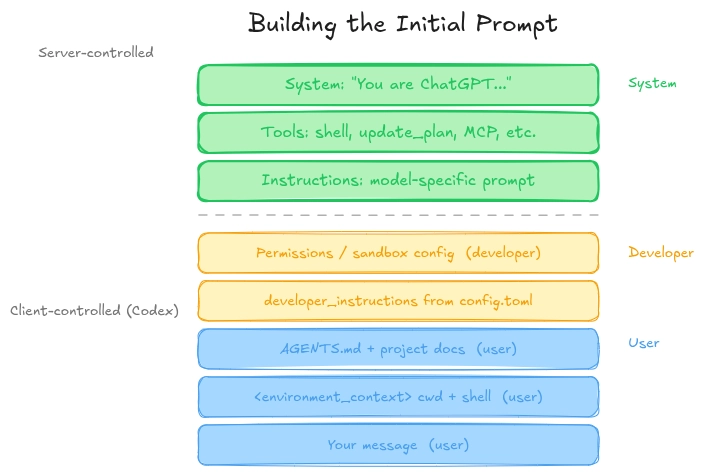
Something that is easy to miss: the order of items in the final prompt is not entirely determined by the client. The Responses API server takes the instructions and tools from the top-level fields and places them before everything in the input array. The resulting prompt order looks like this:
- System message (server-controlled)
- Tool definitions (from
toolsfield) - Instructions (from
instructionsfield) - Everything in
input, in the order you specified
So the top three items are positioned by the server. Items 4 through 8 are positioned by the client (Codex). This means the instructions field, which contains model-specific prompts (either from your model_instructions_file config or the default like gpt-5.2-codex_prompt.md bundled with the CLI), always sits between the tool definitions and the developer messages.
This ordering is critical for prompt caching, which we'll get into next.
Multi-Turn: The Prompt Only Grows
When you continue a conversation, Codex appends the previous assistant message, your new message, and all tool call history to the input array. The prompt from the last API call becomes an exact prefix of the new one.
This is intentional. It's not just how conversations work. It's a performance optimization. More on that next.
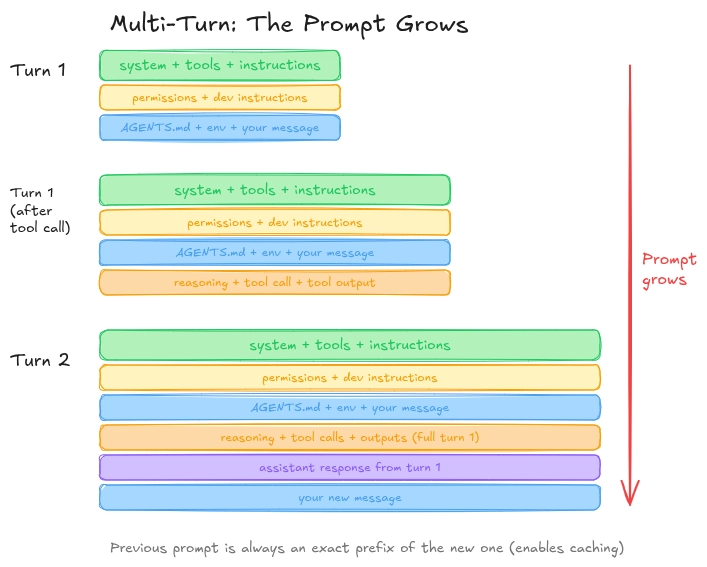
The implication is straightforward: the longer the conversation, the larger every subsequent API call. Each message carries the weight of everything before it.
Prompt Caching: Why Prefix Stability Matters
Here's where it gets practical. OpenAI's prompt caching can reuse computation from a previous inference call, but only if the new prompt starts with an exact prefix match of a cached prompt. When cache hits land, the cost of sampling goes from quadratic to linear over the course of a conversation.
This is why Codex is obsessive about keeping the prompt prefix stable. Anything that changes an earlier part of the prompt causes a cache miss, and you're paying full price again.
From what I can tell, these are the things that nuke your cache:
- Changing available tools mid-conversation. If you add or remove an MCP server tool, the tool definitions in the prompt change, and everything after them is invalidated.
- Switching models mid-conversation. Different models have different bundled instructions, so item #3 in the prompt changes.
- Changing sandbox configuration or approval mode. Alters the permissions message.
- Changing working directory. Updates the environment context.
- MCP tools listing in inconsistent order. There was actually a bug early on in Codex CLI where MCP tools weren't enumerated in a stable order, causing cache misses on every call. MCP servers can also push a
notifications/tools/list_changednotification at any time, which forces a tool list update and potentially a cache miss.
Codex mitigates some of this. When sandbox config or approval mode changes mid-conversation, instead of modifying the original permissions message (which would break the prefix), Codex appends a new developer message with the updated permissions. Same trick for working directory changes: a new user message gets appended rather than editing the old one. This preserves the prefix and keeps caching intact.
The main takeaway is: if you're working in a long Codex session, avoid switching models, adding/removing MCP servers, or changing your sandbox settings unless you need to. Each change is a cache miss, and on a long conversation, that's expensive.
Context Window Management: Compaction
Eventually, the prompt gets too long. Codex deals with this through compaction: replacing the conversation history with a smaller, summarized version.
Early versions of Codex required you to manually run a /compact command, which would ask the model to summarize the conversation so far and use that summary as the new starting point. That worked, but it was manual and clunky.
Now, the Responses API has a dedicated /responses/compact endpoint. It returns a compressed list of items including a special compaction item with encrypted content that preserves the model's internal understanding of the conversation. Codex automatically triggers this when the auto_compact_limit threshold is exceeded.
The encrypted content is worth noting. It means the model's reasoning chain from earlier turns isn't just thrown away and replaced with a text summary. The latent understanding is preserved in an opaque blob that the server can decrypt and use.
Statelessness and Zero Data Retention
Quite a mouthful this one. One thing that surprised me: Codex doesn't use the previous_response_id parameter that the Responses API supports. This parameter would let the server remember previous responses and avoid re-sending the entire conversation each time. But Codex sends everything, every time.
The reason is statelessness and Zero Data Retention (ZDR) support. If the server stores previous responses, that's at odds with ZDR configurations where no user data is persisted. By keeping every request fully self-contained, Codex avoids that conflict entirely.
The encrypted reasoning content from previous turns still works under ZDR. OpenAI stores the decryption key but not the data itself. So the model can still use its prior reasoning without the data being retained server-side.
The tradeoff: you're sending quadratically more JSON over the wire as conversations grow. In practice, the cost of model sampling dominates network transfer costs, so this isn't the bottleneck. Prompt caching is what matters.
AGENTS.md: Do They Actually Help?
Since Codex reads AGENTS.md files and injects them into the prompt as user instructions, it's worth asking: do these context files actually improve agent performance?
Recent research from ETH Zurich (Gloaguen et al., 2026) studied this directly. They built AGENTBENCH, 138 real GitHub issues across 12 repositories, and tested multiple coding agents with and without context files.
The results are sobering:
- LLM-generated context files (the kind you get from
/initcommands) actually reduced performance by about 2% on average across AGENTBENCH, while increasing costs by over 20%. - Developer-written context files provided a marginal improvement, about 4% on average, but still increased costs.
- Context files did not help agents find relevant files faster. Despite often including codebase overviews, agents took roughly the same number of steps to reach the files they needed to modify.
- Agents do follow the instructions in context files. When a context file mentions
uvorpytest, agents use those tools significantly more. The problem isn't instruction-following. It's that the instructions themselves add overhead without proportional benefit. - LLM-generated context files are largely redundant with existing documentation. When the researchers removed all other documentation from the codebase, LLM-generated context files actually helped, improving performance by about 2.7%. This suggests they're only useful when there's no other documentation available.
The researchers' recommendation: skip LLM-generated context files for now. If you write your own, keep them minimal. Specific tooling requirements, not comprehensive overviews the agent can discover on its own.
From my own experience, this tracks. The agents already have mechanisms for navigating codebases. Giving them a wall of text about your project structure is mostly just burning context window space and adding cognitive load to the model. This begs the question, what do we add to the Agents.md file?
What a bad AGENTS.md file looks like
I have a project I call ‘digital-twin’. This is a RAG chat application which is my AI Digital Twin which contains all knowledge about me and is supposed to respond the way I respond. I’ve used the /init command in Claude Code to generate a CLAUDE.md file and this is what I got:
# CLAUDE.md

This file provides guidance to Claude Code (claude.ai/code) when working with code in this repository.

## Project Overview

Digital Twin is an AI-powered chat application that represents a professional persona (Shaheer Ahmed) using retrieval-augmented generation (RAG). Users can chat with the digital twin, which answers questions based on embedded documents and persona information.

## Development Commands

### Backend (FastAPI + Python)
```bash
# Install dependencies (uses uv package manager)
uv sync

# Run the backend server
uvicorn chat:app --reload

# Ingest documents into vector database
python -m backend.core.data_ingest <file_path> <pdf|txt|md> [--source-name <name>]
```

### Frontend (React + Vite)
```bash
cd frontend
npm install
npm run dev      # Development server at http://localhost:3000
npm run build    # Production build
```

### Supabase (Local)
```bash
npx supabase start     # Start local Supabase stack
npx supabase stop      # Stop local Supabase
npx supabase db reset  # Reset database and run migrations
```

## Architecture

### Request Flow
1. Frontend (React) sends chat requests with Supabase anonymous auth tokens
2. Backend validates JWT via Supabase Auth API (`backend/api/auth.py`)
3. `DigitalTwin` class retrieves relevant document chunks via vector similarity search
4. OpenAI generates response using persona + retrieved context + chat history
5. Response streams back via Server-Sent Events (SSE)

### Folder Structure

digital-twin/
├── chat.py                           # Uvicorn entrypoint
├── CLAUDE.md                         # Project documentation for Claude
├── PROJECT_PLAN.md
├── STREAMING_IMPLEMENTATION.md
├── package.json
├── pyproject.toml                    # Python dependencies (uv)
│
├── backend/
│   ├── __init__.py
│   ├── requirements.txt
│   ├── api/
│   │   ├── __init__.py
│   │   ├── auth.py                   # JWT validation
│   │   ├── chat.py                   # FastAPI routes
│   │   └── chat_backup.py
│   └── core/
│       ├── __init__.py
│       ├── data_ingest.py            # Document chunking & embedding
│       ├── data_retrieval.py         # Vector similarity search
│       └── digital_twin.py           # RAG logic & LLM calls
│
├── frontend/
│   ├── index.html
│   ├── package.json
│   ├── vite.config.js
│   ├── tailwind.config.js
│   ├── postcss.config.js
│   ├── README.md
│   ├── public/
│   └── src/
│       ├── App.jsx                   # Main chat UI
│       ├── App.css
│       ├── index.css
│       ├── main.jsx
│       └── supabaseClient.js
│
├── data/
│   ├── me.md                         # Persona/profile data
│   └── projects.md                   # Projects data
│
└── supabase/
    ├── config.toml
    ├── seed.sql
    ├── migrations/
    │   ├── 20260205000100_chat_history_user_rls.sql
    │   └── 20260207000100_documents_vector_rpc.sql
    └── snippets/
        └── Untitled query 180.sql
This is just the beginning of the 3,370 character file but you can already notice a few things which just don’t make sense.
Firstly, Claude included information on how to run the projects backend and frontend. This is very common knowledge with LLMs and it is not something that needs to be repeated to the AI assistant.
Second is the inclusion of the folder structure of the repo. You might think this is valuable information to pass on to the AI so that it doesn’t have to run commands to get the folder structure itself, but in a practical experiment ran by a YouTuber Theo - t3 .gg where he demonstrated that regardless of adding the folder structure in the AGENTS/CLAUDE.md file, the AI assistant still runs commands to find the files on their own.
Another reason not to add the folder structure inside of the AGENTS.md file is because this kind of information doesn’t remain static forever. You might change files, add a new folder, re-organize, etc. As the information changes, you will need to continually update the AGENTS.md file to keep up which is a headache. Might as well have the AI run the commands whenever it needs to.
How to fix this
Now here's what actually helps. Minimal. Only stuff the agent can't figure out by reading the code:
# CLAUDE.md

This file provides guidance to Claude Code (claude.ai/code) when working with code in this repository.

## Project Overview

Digital Twin is an AI-powered chat application that represents a professional persona (Shaheer Ahmed) using retrieval-augmented generation (RAG). Users can chat with the digital twin, which answers questions based on embedded documents and persona information.

## Architecture

### Request Flow
1. Frontend (React) sends chat requests with Supabase anonymous auth tokens
2. Backend validates JWT via Supabase Auth API (`backend/api/auth.py`)
3. `DigitalTwin` class retrieves relevant document chunks via vector similarity search
4. OpenAI generates response using persona + retrieved context + chat history
5. Response streams back via Server-Sent Events (SSE)

### Key Components
- **`chat.py`** - Uvicorn entrypoint that imports FastAPI app from `backend/api/chat.py`
- **`backend/core/digital_twin.py`** - Core RAG logic: context assembly, history management, LLM calls
- **`backend/core/data_retrieval.py`** - Vector similarity search using `match_documents_filtered` RPC
- **`backend/core/data_ingest.py`** - CLI tool to chunk documents and store embeddings
- **`frontend/src/App.jsx`** - Single-page chat UI with streaming support

### Database Schema (Supabase/PostgreSQL)
- **`documents`** - Vector store with `embedding` (1536-dim), `content`, and `metadata` columns
- **`chat_history`** - Chat messages with RLS per `user_id`
- **`match_documents_filtered`** - SQL function for cosine similarity search

## RAG Configuration
- Embedding model: `text-embedding-3-small` (1536 dimensions)
- LLM model: `gpt-4.1-mini`
- Top-K retrieval: 5 chunks
- Similarity threshold: 0.5
- Chunk size: 1000 chars with 200 overlap
The architecture initially mentioned by Claude was good as that is something project specific and not immediately obvious until you dive into the code. Providing information about database schema, data flow, RAG configuration which is all information hidden inside files, this is worth it.
The trick is to add information to this file incrementally when you see the AI assistant is falling short or taking to long to find information that should be blatantly obvious. It should not be a comprehensive dump of information.
Skills: Structured Procedural Knowledge
There's a related but distinct concept gaining traction: Agent Skills. This was popularized by Anthropic when they introduced skills to Claude Code but essentially these are structured packages of procedural knowledge (instructions, code templates, scripts, and examples written as a simple markdown file) that get injected into the agent's context whenever you start a conversation with any of these tools. Now, this same concept (or similar) is used by every major provider of AI coding assistants.
The SkillsBench benchmark (Li et al., 2026) provides some hard numbers on this. They tested 7 agent-model configurations across 84 tasks spanning 11 domains:
- Curated (human-written) Skills improved pass rates by 16.2 percentage points on average. That's substantial.
- Self-generated Skills (where the model writes its own procedural guidance before solving the task) provided zero benefit on average. In some cases, they made things worse.
- The effect varies wildly by domain. Healthcare and Manufacturing saw massive gains (+52pp and +42pp respectively). Software Engineering saw only +4.5pp.
- Less is more. Tasks with 2-3 Skills performed best. Tasks with 4+ Skills showed diminishing returns. Detailed, focused Skills outperformed comprehensive documentation.
- Smaller models with Skills can match larger models without them. Claude Haiku 4.5 with Skills (27.7%) outperformed Claude Opus 4.5 without Skills (22.0%).
The key insight here: the format and specificity of what you put into the context matters more than volume. Focused, procedural, step-by-step guidance beats exhaustive documentation every time. And models cannot reliably generate this knowledge for themselves. They need human-curated expertise.
This has direct implications for how you set up your Codex environment. Rather than dumping a comprehensive AGENTS.md that describes your entire codebase, you're better served by focused skill files that address specific workflows: how to run tests, how to deploy, what linting rules to follow, what package manager to use.
So What Do We Do?
Based on all of this (the Codex internals, the AGENTS.md research, and the Skills benchmarks), here's what I'd suggest:
1. Keep conversations focused. Long conversations mean growing prompts, more tokens, and eventually compaction. Start a new thread for new tasks when possible. That said, starting fresh isn't free either. Compaction preserves the model's latent reasoning via encrypted content, so a long conversation that gets compacted still retains some understanding of what happened before. A brand new thread has none of that. The tradeoff is: new thread gives you a clean context window with zero baggage, compacted thread gives you a smaller window but with residual understanding. My rule of thumb: if the new task is unrelated to what you were doing, new thread. If it's a continuation or follow-up, let compaction do its job.
2. Don't change tools, models, or settings mid-conversation. Every change breaks prompt caching and costs you.
3. Be skeptical of auto-generated context files. The /init command is convenient, but the evidence says it usually hurts more than it helps. Write your own, or don't use one at all.
4. If you write an AGENTS.md, keep it minimal. Specific build commands, test commands, required tools, coding conventions that deviate from the norm. Skip the project overview. The agent will explore the codebase anyway.
5. Invest in focused Skills over comprehensive docs. Short, procedural, task-class-specific instructions with working examples. 2-3 targeted files beat one massive one.
6. Mind the context window. If you're pasting large files into the conversation, you're eating into the space available for tool call outputs and reasoning. Be selective about what you feed in.
Try this!
As a fun activity, try fixing up an existing AGENTS.md file you have. I’m sure with what you have read so far, there will be tons of items you will feel that you need to clean up from your file. Monitor your LLM token usage and responses before and after you make these changes as I’ve shown you in the previous example.
As a routine: Start out with no AGENTS/CLAUDE.md file. Do not use the /init command for your files. Write them yourself and only when you feel like the AI is not getting certain information right or to your liking. I think you’re going to have a much better experience using these simple fixes.
The Propagated.ai team consists of AI researchers, marketers and product strategists dedicated to helping companies create exceptional digital experiences through the power of artificial intelligence and user-centered design.